Posts

New Index Page 2017

Image
In the projects leading up to this big comprehensive project we learned about how to get color for a page, How to add depth to a page, and how to incorporate google web fonts into a page. I added color by using the gray and blues from the background image and the picture of myself. I added depth with the use of Wrapping and ribbons on the header and by having a large 3d background image. I used google web fonts for the font on the .logo and on the links to my blogger and word press blogs at the bottom of my index page. Check it our for yourself Here!

TV25 Website

Image
TV25 Website Process I started by creating the page itself by using a bootstrap template. However the template that i chose did not have the carousel that i wanted to i manually inserted it and added a couple of pictures of the area that TV25 covers. I used a couple different images and made them into links to act as buttons to link to TV25's Social media's and their contact information. This is displayed on every page. I also added the dropdown menus and links to the other pages into the navbar After that i duplicated the home page 4 times and started making the How To Watch page. This page explains how to set up the antenna and connect it to your tv in order to receive TV25. I also embedded the video that they have on their youtube channel into this page, like their current site i determined that for the amount of content it was better to center allign text especially for the next page. This Page is for the FAQ the content is separated into Questi...

Logo Mock-Ups

Image
Some cool mock-ups of my final logo!

Elmer's Electric Logo Colorized

Image
These are the colorized versions of the final logos i decided to go with. I experimented by adding a few different shades into the mix for example i added that brownish gray to the blue one and for the red one there is a very dark blue serving as the background and as a color for the text. In the end i also added a outer glow effect to the lightning bolt. I personally love the These are what i started with.  I originally got myself down to these 2 styles of the logo one with a wired lightning bolt in the back and another with wired text and a full lightning bolt in the front. I Chose the electric blue because lightning is generally blue. I chose the yellow because thats what most people associate with electricity, And i chose the red because it resembles the red on the "Danger high voltage Sign". I eventually decided to scrap the yellow because it was contrasting a bit too much.

Revised Elmer's Electric Logo

Image
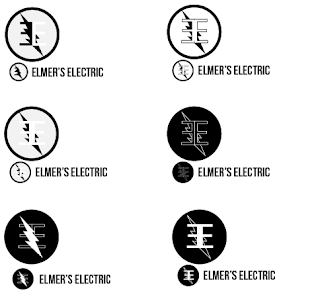
Based on feedback i was given i was told that it was hard to see the E's when they had the lightning bolt over them so i tried a few different things to get around this. I started by just moving the lightning bolt to the back which i personally think looks good. Next i tried making the E's white on a black background to give more contrast. Then i tried combining these two methods and the end result is the logo in the bottom right. However i like the middle left one as well.

Elmer's Electric Logos

Image
on this art board i tried out a bunch of different shapes for the e's and experimented with many different fonts. On this art board i selected which shape i liked ( the circle) and tried out a different font to make it relatable to the companies theme ( Elmer's Electric) I then decided to make a lightning bolt going through the E's which i like the look of. Here i tried combining the logo with a font and changing the stroke to fit the size to match the fonts size.

Wordpress.com VS Wordpress.org

Image
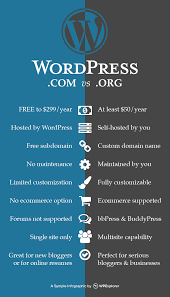
Wordpress.com VS Wordpress.org Wordpress.com WordPress   i s an online, open source website creation tool written in PHP. But in non-geek speak, it's probably the easiest and most powerful blogging and website content management system in existence today. Wordpress.com is distinguishable from wordpress.org because wordpress.com is fully hosted by word-press. However there are many differences between the two. For example .com has limited theme options for your website/blog/store etc. No plugins can be used. It has limited storage. Wordpress.com is free to use however there are ads but these ads can be removed by paying. You have little control. For hobby bloggers, dabblers, and beginners Wordpress.org Wordpress.org is close to the same thing as wordpress.com. However wordpress.org came first and is self-hosted meaning that you ( the one with the website) is hosting the site on your own network as opposed to the site just doing it for you. It has full theme...