Posts

Professional Article-Review

Professional Article Review http://www.animationarena.com/drawing-for-animation.html In this article, The author: Annie Grey talks about and explains the many different ways and techniques that can be used for 2d animations based off of physical drawings, such as perspective, drawing based off of a model or physical thing that is being looked at, correctly drawing the human figure, and drawing based off of imagination. In doing so the author uses sketches and different steps of techniques in order to give the reader of this article a better idea about how to draw correctly for a 2d animation.

How to create a coffee cup in Maya in 7 easy steps!

Image
 How to make a coffee cup in Maya in 7 easy steps! Create file 1. Go to File>Project window and create a new project name ( make sure it is saving to the right place) and then click accept 2. Save. Go to File>Save scene as or hit Command-S, save it to the scenes folder in your "coffee cup folder". Now you are ready to start modeling! Cup 3. Start by going to the Polygons toolbar and creating a polygon pipe. Now go to the channel box and set radius to 2.5 and heigh to 11. 4. Next i recommend that you set the x and y translation to 0 to make it completely centered. as well as set the translate y to 2.8 to make it flat to the ground Handle 5. Next we are going to create the handle for the mug. Start by making a torus about the size you want the handle to be. 6. Next right-click then change into Face mode. Next select half of the torus and then delete it. This creates the handle! 7. Now go into the channel box and set the X, and Y rot...

Professional Project Review Post

Image
Animation By Rachel Peck Character Animation Project - Adobe Flash Professional . Perf. Rachel Peck.  YouTube . N.p., 15 Nov. 2014. Web. 14 Dec. 2016. In this animation made in Adobe Flash Professional. the main character is picking flowers and encounters a swarm of bees. this disheartens the main character causing them to give up on the flowers because they are not worth the effort. I have no experince in Adobe Flash, However from what i can tell this Animation uses many of the key principles of Animation. Such as the walk cycle. If i could learn anything from this animation i would have to say that i would like to apply the superior walk cycle to my 2d animation projects, because i feel like mine are lacking. Even though i have already learned how to make them i would like to improve my own. I feel like the scenario and story was very well made but with some extra input a lot of detail could be added to this such as adding color or something of that sort.

Halloween Website

Image
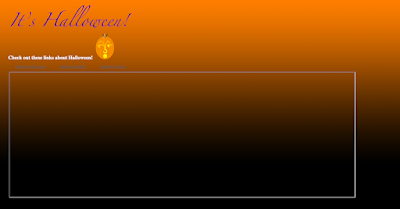
In this project we learned a few new things. One of the more useful things that we learned during this project was about Iframes. Iframes are boxes that can open links in a page instead of opening a new page. We learned that you have to name the iframe and make the link the target of the iframe. We also learned that we can tile a background gradient infinitely and create a solid background gradient, as seen in the website. We also created a jack o' lantern and a "it's halloween" color changing title text that changes between black and purple. It gives a spooky addition to the website.

Multi-plane

Image
Multi-plane animation. The premise of this project was to make a multi-plane layer type of animation sort of like some of Walt Disney's various nature scenes. Using multiple layers and adobe after effects we were able to "scroll" through the nature scene kind as if you were walking through it. First we created all of the assets for the animation. I created a moon, stars, trees, leaves, grass, and then found some silhouette of some various animals to use. Then i created the actual ground and colored it and then added the grass to the front layer and not the back layer so it gives an illusion of depth. Then i added the trees to the various ground layers. Now it was time to animate. We made keyframes on each end of the layers and then just simply dragged them through creating motions. Overall i found this to be the most enjoyable animation so far even though we have only done a few. However if feel like this was a large amount of my effort and gave me excitement to se...

Story Animation

Image
These are some screenshots of me working on my story animation This project "story animation" was a combination of everything that we have learned so far in Adobe After Effects. The basic premise of this project was to create a story and then use our knowledge so far to create a animation. I created the story of "Tom" I do not know why i chose the name tom but it was just something simple to use at the time. Tom was sent on a quest by the mayor to take down bartholomew a evil horse that has taken the color away from everything in the land besides the sun. Tom doesn't really face that many challenges on the way and then the encounter with bartholomew appears and doesn't exactly be a problem. Tom wonders why nobody else was able to defeat bartholomew, he didn't even fight back. I feel that this project was a little bit rushed even though we were given about a week to do it. I could make a better if given the time. I would start by making the walk c...

Maya Castle

Image
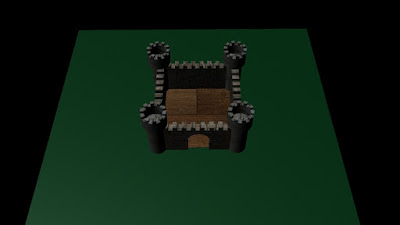
For our first maya project we created a castle using the basic polygon shape tools. With this castle i created a grassy platform for the castle to sit on. I colored the castle black and white. The castles towers were made by taking 2 cylinders one small one and one long one and together made a cylinder with a slightly fatter cylinder above it. I then changed to the face mode and selected every other face then extruded and pulled out to make the port-cutlas type ridges on top. i repeat this with the main walls of the castle.  The doorway was made by taking a cube and putting a sphere on top of it then differencing it with the wall i chose. Then we used blinn/lambert to edit the texture of the walls and add brick/stone brick textures for the walls and the towers. So far maya has been pretty frustrating but I am hoping to get better at it in the future. JPEG Renders: